SV431DD2DUA - Startech 4-Port Dual KVM Switch with Audio for DVI Computers

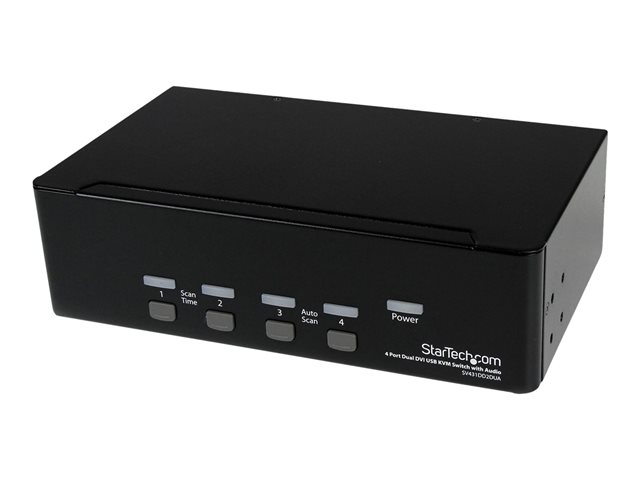
Built-in USB Hub (SV431DD2DUA) - KVM / audio / USB switch - 4 x KVM / audio / USB - 1 local user - desktop - for P/N: IM12D1500P, SV431RACK, SVA12M2NEUA, SVA12M5NA, USBDVI4N1A10, USBDVI4N1A6
4 in stock
Manufacturer StarTech
Part number SV431DD2DUA
  • €293.82
Add to basket
  • Information
    • Supports video resolution up to 2048 x 1536
    • Built-in 2-port USB 2.0 hub for added connectivity
    • Allows control of up to four computers with a single keyboard and mouse
    • Compact desktop form factor for efficient use of space
    • Compliant with FCC and RoHS standards
    Share a keyboard, mouse and dual DVI displays/monitors between 4 multimedia computers. The SV431DD2DUA 4-port Dual DVI USB KVM Switch allows up to four PCs, each with dual DVI video outputs, to share two monitors, one microphone and set of speakers, one keyboard and one mouse as well as two other USB peripherals. An ideal solution for graphic designers, CAD/CAM designers or educational and financial institutions, the dual view KVM Switch allows you to instantly switch back and forth between dual DVI display PCs at the touch of a button, while maintaining professional level video quality on both monitors. The dual DVI switch also features an integrated USB hub port that allows USB 2.0 peripherals such as thumb drives, external hard drives or web cams to be shared between attached systems - eliminating duplicate peripheral costs. Please Note: While both DVI-I (analog mode) and DVI-D (digital only) are supported by the KVM, both source PCs should output the same signal type for proper switching. It is recommended wherever possible to use DVI-D cables across all PC to KVM and KVM to Console connections. Please contact technical support if you require assistance identifying your source. If you'd like to mount this KVM switch to your server rack, StarTech.com offers a 1U Rackmount Bracket (sold separately) that turns this KVM into a rackmountable KVM.
  • Specifications
  • Extended specifications
  • Accessories
  • Downloadable files

Suggested accessories

(function(){try{var el=document.querySelector('.price-text');if(!el)return;var priceText=el.textContent.replace(/[^0-9.,]/g,'').replace(',','.');var price=parseFloat(priceText);if(!price||price<=0)return;var h1=document.querySelector('h1');if(!h1)return;var name=h1.textContent.trim();var stockEl=document.querySelector('.product-card-stock-container');var avail='https://schema.org/InStock';if(stockEl){var st=stockEl.textContent.toLowerCase();if(st.indexOf('out')>-1||st.indexOf('0 in stock')>-1)avail='https://schema.org/OutOfStock';}var img=document.querySelector('.product-card img');var desc=document.querySelector('meta[name="description"]');var urlParts=window.location.pathname.split('/');var brand='';for(var i=0;i-1){brand=name.split(' - ')[1].trim().split(' ')[0];}var sku='';var skuMatch=name.match(/^([A-Z0-9]+-?[A-Z0-9]+)\s*-/);if(skuMatch)sku=skuMatch[1];var schema={'@context':'https://schema.org','@type':'Product','name':name,'offers':{'@type':'Offer','price':price.toFixed(2),'priceCurrency':'EUR','availability':avail,'url':window.location.href,'seller':{'@type':'Organization','name':'Stacked IT'}}};if(brand)schema.brand={'@type':'Brand','name':brand};if(sku)schema.sku=sku;if(img)schema.image=img.src;if(desc)schema.description=desc.getAttribute('content');var existing=document.querySelectorAll('script[type=\"application/ld+json\"]');for(var j=0;j (function(){ if(window.location.pathname!=='/cms/contact')return; var s=document.createElement('style'); s.textContent=` /* Contact Page Upgrade - Stacked IT 2026 */ .content-container .content-show{max-width:960px;margin:0 auto;padding:0 16px} .content-container .content-show>style,.content-container .content-show>style+br,.content-container .content-show>style+br+br{display:none!important} .content-container .content-show img[src*="shutterstock"]{display:none!important} .content-container h2.text-left{font-family:'Outfit',sans-serif;font-size:28px;font-weight:700;color:#1a1a2e;text-align:center;margin:32px 0 8px;letter-spacing:-0.02em} .content-container h2.text-left::before{content:'Get in Touch';display:block;font-size:12px;font-weight:600;letter-spacing:0.08em;text-transform:uppercase;color:#EE7623;background:rgba(238,118,35,0.08);padding:6px 14px;border-radius:20px;width:fit-content;margin:0 auto 16px} .content-container .content-show p:first-of-type{text-align:center;color:#5a5a6e;font-size:15px;margin-bottom:28px;max-width:520px;margin-left:auto;margin-right:auto} .content-container form[action*="contact"]{background:#fff;border:1px solid #e4e4e8;border-radius:12px;padding:32px;max-width:560px;margin:0 auto 32px} .content-container form[action*="contact"] label{display:block;font-family:'Outfit',sans-serif;font-size:13px;font-weight:500;color:#5a5a6e;margin-bottom:6px;margin-top:16px} .content-container form[action*="contact"] label:first-child{margin-top:0} .content-container form[action*="contact"] input[type="text"],.content-container form[action*="contact"] textarea{width:100%;font-family:'Outfit',sans-serif;font-size:15px;color:#1a1a2e;background:#f8f8f9;border:1px solid #e4e4e8;border-radius:8px;padding:12px 14px;outline:none;transition:border-color 0.2s,box-shadow 0.2s;box-sizing:border-box} .content-container form[action*="contact"] input[type="text"]:focus,.content-container form[action*="contact"] textarea:focus{border-color:#EE7623;box-shadow:0 0 0 3px rgba(238,118,35,0.08)} .content-container form[action*="contact"] input.input-invalid,.content-container form[action*="contact"] textarea.input-invalid{border-color:#e4e4e8} .content-container form[action*="contact"] textarea{min-height:110px;resize:vertical} .content-container form[action*="contact"] button[type="submit"],.content-container form[action*="contact"] input[type="submit"]{display:block;width:100%;font-family:'Outfit',sans-serif;font-size:15px;font-weight:600;color:#fff;background:#EE7623;border:none;border-radius:8px;padding:13px 28px;cursor:pointer;transition:background 0.2s;margin-top:20px} .content-container form[action*="contact"] button[type="submit"]:hover,.content-container form[action*="contact"] input[type="submit"]:hover{background:#d5641a} .content-container h2:not(.text-left){font-family:'Outfit',sans-serif;font-size:22px;font-weight:600;color:#1a1a2e;margin:32px 0 16px} .content-container p{font-family:'Outfit',sans-serif;font-size:14px;line-height:1.6;color:#5a5a6e} .content-container a[href^="tel"],.content-container a[href^="mailto"]{color:#EE7623;font-weight:500;text-decoration:none} .content-container a[href^="tel"]:hover,.content-container a[href^="mailto"]:hover{text-decoration:underline} .content-container iframe[src*="map"]{border-radius:12px;border:1px solid #e4e4e8;margin-top:8px} `; document.head.appendChild(s); /* Add helpful subtext under heading */ var h2=document.querySelector('.content-container h2.text-left'); if(h2){ h2.textContent='How can we help?'; var sub=document.createElement('p'); sub.style.cssText='text-align:center;color:#5a5a6e;font-size:15px;margin:8px auto 28px;max-width:520px;font-family:Outfit,sans-serif'; sub.textContent="Whether you need a quote, have a question about a product, or want to discuss your IT requirements \u2014 we\u2019re here to help."; h2.parentElement.insertBefore(sub,h2.nextSibling); } /* Add trust badges after the map */ var mapFrame=document.querySelector('.content-container iframe[src*="map"]'); if(mapFrame){ var trustDiv=document.createElement('div'); trustDiv.style.cssText='display:flex;gap:20px;flex-wrap:wrap;justify-content:center;margin:32px 0 16px;padding:20px 0;border-top:1px solid #e4e4e8;font-family:Outfit,sans-serif'; var badges=[ ['\u2705','20+ years in business'], ['\u26A1','Fast nationwide delivery'], ['\uD83D\uDC64','Expert support team'], ['\uD83D\uDCCB','Competitive trade pricing'] ]; badges.forEach(function(b){ var span=document.createElement('span'); span.style.cssText='display:flex;align-items:center;gap:6px;font-size:13px;color:#5a5a6e;font-weight:500'; span.textContent=b[0]+' '+b[1]; trustDiv.appendChild(span); }); mapFrame.parentElement.appendChild(trustDiv); } })();